2-1. MenuItem 구조체 1개  동적 생성 - 이해하기

문제 설명

카페 메뉴 1개를 저장하기 위해 MenuItem 구조체를 Heap 메모리에 생성하려고 한다. malloc()을 사용하여 메뉴 1개를 저장할 메모리를 생성하고, 생성된 메모리의 구조체에 값을  대입하시오. 


요구사항


1. MenuItem 1개 공간을 동적 생성하시오.

  • menu_id = 101
  • name  = "Americano"
  • price = 3000
  • stock = 10

2. -> 연산자를 사용하시오.

3. 사용 후 메모리 해제하시오.

4. [중요] 코드 작성 후 MenuItem * type의 변수와 malloc()을 통해 할당받는 메모리를 그림으로 그려보시오. 


참조 코드

아래 참조코드의 주석을 참조하여 코드를 작성하시오. 

typedef struct{
    int menu_id;
    char name[20];
    int price;
    int stock;
} MenuItem;

int main(void)
{
    // 1. 동적할당할 메모리를 가리킬 MenuItem* type의 포인터변수 생성


    // 2. malloc()을 이용하여  MenuItem 1개 크기의 동적 메모리 생성
   
    // 3. 구조체의 멤버 menu_id에 101값 대입
    // 예) menu_item->menu_id = 101;

    // 4. 구조체의 멤버 name에 "Americano" 대입
    // 예) strcpy(menu_item->name,"Americano");

    // 5. 구조체의 멤버 price에 3000 대입
    // 예) menu_item->price=3000;

    // 6. 구조체의 멤버 stock 에 10 대입
    // menu_item->stock=10;

    // 7. 동적할당 받은 구조체 멤버 출력하기
    // printf("%d %s %d %d\n", menu_item->menu_id, menu_item->name, menu_item->price, menu_item->stock);

    // 8. 메모리 해제하고 포인터 변수 NULL 초기화 하기
    

    return 0;
}
 
 
예상 코드
더보기
#include <stdio.h>
#include <stdlib.h>
#include <string.h>

typedef struct{
    int menu_id;
    char name[20];
    int price;
    int stock;
} MenuItem;

int main(void)
{
    // 1. 동적할당할 메모리를 가리킬 MenuItem* 타입 포인터 변수 생성
    MenuItem* menu_item;

    // 2. MenuItem 1개 크기의 동적 메모리 생성
    menu_item = (MenuItem*)malloc(sizeof(MenuItem));

    // 메모리 할당 실패 확인
    if(menu_item == NULL)
    {
        printf("메모리 할당 실패\n");
        return 1;
    }

    // 3. menu_id 값 대입
    menu_item->menu_id = 101;

    // 4. name 값 대입
    strcpy(menu_item->name, "Americano");

    // 5. price 값 대입
    menu_item->price = 3000;

    // 6. stock 값 대입
    menu_item->stock = 10;

    // 7. 구조체 멤버 출력
    printf("%d %s %d %d\n",
            menu_item->menu_id,
            menu_item->name,
            menu_item->price,
            menu_item->stock);

    // 8. 메모리 해제 후 NULL 초기화
    free(menu_item);
    menu_item = NULL;

    return 0;
}
 

2-2. MenuItem 구조체 10개  동적 생성 및 메뉴 저장

문제 설명

OO 카페 키오스크 시스템은 메뉴 정보를 메모리에 저장하여 관리한다. 프로그램 시작 시 커피 메뉴 10개를 저장할 수 있는 공간을 Heap 메모리에 미리 생성하고, 사용자에게 메뉴 정보를 입력받아 저장하시오. 메뉴가 저장될 때는 현재 등록된 메뉴 개수(menu_count)를 배열의 인덱스로 사용하여 저장한다.


요구사항


1. MenuItem 구조체 10개를 저장할 수 있는 Heap 메모리를 동적 생성하시오.


2. 메뉴 개수를 저장할 변수 menu_count를 선언하고 0으로 초기화하시오.

int menu_count = 0;


3. 생성된 메모리는 배열 형태로 접근하시오.


4. menu_count를 인덱스로 사용하여 메뉴 정보를 입력받아 저장하시오.

  • 입력 항목
    • 메뉴번호 (menu_id)
    • 메뉴명 (name)
    • 가격 (price)
    • 재고 (stock)
  • 입력 예:
메뉴번호 입력: 101
메뉴명 입력: Americano
가격 입력: 3000
재고 입력: 10
 
  • 저장 예:
menu_list[menu_count].menu_id
menu_list[menu_count].name
menu_list[menu_count].price
menu_list[menu_count].stock


5. 입력이 완료되면 menu_count를 1 증가시키시오. 

 
6. 저장된 메뉴 정보를 출력하시오.

출력 예:

101 Americano 3000 10


7. 사용이 끝난 메모리는 free()를 사용하여 해제하시오.


8. 메모리 해제 후 포인터를 NULL로 초기화하시오.


9. [중요] 코드 작성 후 MenuItem * type의 변수와 malloc()을 통해 할당받는 메모리를 그림으로 그려보시오. 


참고 코드 

typedef struct{
    int menu_id;
    char name[20];
    int price;
    int stock;
} MenuItem;

int main(void)
{
    // 1. MenuItem 구조체 배열을 가리킬 포인터 변수 선언

    // 2. menu_count 변수 선언 및 0 초기화

    // 3. MenuItem 10개 크기의 Heap 메모리 생성

    // 4. 메모리 할당 실패 여부 확인

    // 5. menu_count를 인덱스로 사용하여 메뉴 정보 입력받기

    // 6. 입력 완료 후 menu_count 증가

    // 7. 저장된 메뉴 정보 출력

    // 8. 메모리 해제하고 포인터 변수 NULL 초기화 하기


    return 0;
}


예상코드

더보기
#include <stdio.h>
#include <stdlib.h>
#include <string.h>

typedef struct{
    int menu_id;
    char name[20];
    int price;
    int stock;
} MenuItem;

int main(void)
{
    MenuItem* menu_list;
    int menu_count = 0;

    menu_list = (MenuItem*)malloc(sizeof(MenuItem) * 10);

    if(menu_list == NULL)
    {
        printf("메모리 할당 실패\n");
        return 1;
    }

    printf("메뉴번호 입력: ");
    scanf("%d", &menu_list[menu_count].menu_id);

    printf("메뉴명 입력: ");
    scanf("%s", menu_list[menu_count].name);

    printf("가격 입력: ");
    scanf("%d", &menu_list[menu_count].price);

    printf("재고 입력: ");
    scanf("%d", &menu_list[menu_count].stock);

    menu_count++;

    printf("\n[저장된 메뉴 목록]\n");

    for(int i = 0; i < menu_count; i++)
    {
        printf("%d %s %d %d\n",
               menu_list[i].menu_id,
               menu_list[i].name,
               menu_list[i].price,
               menu_list[i].stock);
    }

    free(menu_list);
    menu_list = NULL;

    return 0;
}


1-1. malloc() 이해

문제 설명

다음 코드에서 malloc()이 하는 역할을 설명하시오.


코드

int *ptr;

ptr = (int*)malloc(sizeof(int));


요구사항

  1. malloc()의 역할을 설명하시오.
  2. 2개의 메모리 공간이 어느 영역에 어떻게 생성되는지 설명하시오.

예상답안

더보기
1. 프로그램 실행 중 필요한 메모리를 생성한다.
 
2.
- 1번라인은 stack 영역에 int *형 변수 공간 생성
- 3번라인은 heap 영역에 int형 (4byte) 정수 1개의 공간 생성
- ptr이 heap영역에 생성된 메모리의 시작 주소를 저장한다. 


1-2. 생성된 동적메모리 접근하기


문제 설명

다음 코드 실행 후 메모리의 값을 설명하시오.


코드

int *ptr;

ptr = (int*)malloc(sizeof(int));

*ptr = 100;
 

요구사항

  1. ptr 변수에는 무엇이 저장되는가?
  2. *ptr에는 무엇이 저장되는가?
  3. 값 100은 어느 메모리 영역에 저장되는가?

예상답안

더보기

1. 3번 라인에서 할당받은 heap 영역의 메모리 주소

2.  100

3. 3번 라인에서 할당받은 heap 영역의 메모리 주소


1-3. free()

문제 설명

다음 코드에서 free()의 역할을 설명하시오.


코드

free(ptr);


요구사항

  1. free()가 하는 일을 설명하시오.
  2. ptr 변수도 같이 없어지는가? (O / X)
  3. free() 후 ptr=NULL;을 사용하는 이유를 설명하시오.

예상답안

더보기

1. free(ptr) -> ptr이 가리키고 있는  malloc()으로 점유했던 heap 메모리 공간을 해제 한다. 

2. ptr변수는 stack에 int* 형으로 생성된 변수로 heap영역의 메모리 공간 해제와 상관없다. 

3. ptr은 여전히 예전 주소를 가지고 있으나 해제된 메모리 공간에 접근하지 않도록  NULL값으로 초기화 해준다.  


1-4. 배열과 malloc()의 비교

문제 설명

다음 두 코드의 메모리 할당을 설명하시오. 


코드

int arr[10];
 

int *arr;

arr=(int*)malloc(sizeof(int)*10);
 

요구사항

  1. 1번 코드의 arr이 가리키는 메모리 영역과 2번 코드 arr이 가리키는 메모리 영역을 설명하시오. 
  2. 1번코드의 메모리 공간의 크기가 계산되는 시점과 2번코드의 메모리 공간의 크기가 계산되는 시점을 설명하시오.

예산 답안

더보기

1. 1번 코드의 arr은 stack 영역에 생성된 int형, 크기10개의 배열의 첫번째 요소의 주소와 같고,  
     2번 코드의 arr은 heap 영역에 생성된 int형 4byte *10 (40byte) 의 크기의 메모리 영역의 시작주소를 가리킨다. 


2. 1번 코드는 int 크기와 배열 10의 크기를 컴파일 시점에 알고 있어서 40byte의 크기를 컴파일 시점에 알 수 있고, 
    2번 코드는 malloc() 이 실행되는 시점에 메모리 크기가 계산되고 할당이 되어 실행시점에 메모리 크기40byte를 알 수 있다. 


1-5. 메모리 해제 후 메모리 접근


문제 설명

다음 코드의 실행 결과를 예측하시오.


코드

int *ptr;

ptr=(int*)malloc(sizeof(int));

*ptr=50;

free(ptr);

printf("%d",*ptr);
 

요구사항

  1. 코드의 오류부분을 찾고 왜 그런지 설명하시오.
  2. 이 포인터를 무엇이라고 부르는지 작성하시오.

힌트

free 이후 메모리 접근


예상답안
더보기
1. 9번 라인에 해제한 메모리의 값을 출력하고 있다. 
 
2. Dangling Pointer (댕글링 포인터) - 해제된 메모리를 가리키는 포인터


1. 문제 설명

3단계에서 구현한 키오스크 프로그램은 메뉴 정보를 구조체 배열로 저장하고, 메뉴 등록 / 조회 / 변경 / 삭제 기능을 수행할 수 있다. 이번 4단계에서는 주문 기능에 재고 관리를 추가한다. 사용자는 판매중인 메뉴를 선택하여 주문할 수 있으며, 시스템은 주문 수량이 재고보다 많은지 확인해야 한다. 결제가 완료되면 주문한 수량만큼 재고를 차감하고, 재고가 0이 된 메뉴는 자동으로 품절 처리한다.

단,4단계 재고관리 기능은 과제의 선택사항이고, 3단계 구현에 시간이 더 필요한 학생은 3단계 구현에 시간을 더 들이길 바란다. 그러나 지난 화요일(5/19) 수업을 참조하여 파일 분할은 수행하여 제출한다. 

2. 목표

  • 메뉴 정보에 재고수량을 추가하여 관리할 수 있다.
  • 주문 시 재고를 확인할 수 있다.
  • 재고보다 많은 수량은 주문할 수 없도록 처리할 수 있다.
  • 결제 완료 후 재고를 차감할 수 있다.
  • 재고가 0이 된 메뉴를 자동으로 품절 처리할 수 있다.
  • 소스코드의 헤더파일( *.h) 구현파일(*.c) 파일을 구분하여 기능단위로 파일을 분할 할 수 있다. 

3. 요구사항

3.1 데이터 구조 수정

3.1.1 MenuItem 구조체 수정

기존 MenuItem 구조체에 재고수량 stock을 추가하시오.

자료구조 멤버이름 멤버 자료형 설명
메뉴 정보: MenuItem
  menu_id int 메뉴번호
  name char[20] 메뉴명
  price int 가격
  status int 1. 판매중, 2. 품절
  stock int 재고수량


3.2 메뉴 등록 기능 수정 - register_menu_item()

기존 메뉴 등록 기능에 재고수량 입력을 추가하시오.

요구사항:

  • 커피 메뉴인지, 디저트 메뉴인지 선택한다.
  • 메뉴명, 가격, 재고수량을 입력받는다.
  • menu_id는 자동 증가로 설정한다.
  • status는 기본값 “판매중(1)”으로 설정한다.
  • 입력한 재고수량이 0이면 status를 품절(2)로 설정한다.
  • 배열에 저장한다.

출력 예:

메뉴구분 (1. 커피, 2. 디저트): 1
메뉴명 입력: 아메리카노
가격 입력: 3000
재고수량 입력: 20
[등록 완료]


3.3 메뉴 조회 기능 수정 -  retrieve_menu_item()

기존 메뉴 조회 화면에 재고수량을 함께 출력하시오.

출력 예:

====================[Coffee]============================
No   Name                  Price    Status       Stock
========================================================
101  Americano              3000     AVAILABLE    20
102  Cafe Latte             4000     AVAILABLE    15
103  Cappuccino             4000     SOLD OUT     0
104  Vanilla Latte          4500     AVAILABLE    8

====================[Dessert]===========================
No   Name                  Price    Status       Stock
========================================================
201  Cheesecake             5000     AVAILABLE    5
202  Chocolate Cake         5000     AVAILABLE    7
203  Tiramisu               5500     SOLD OUT     0
==================================================


3.4 메뉴 변경 기능 수정 - modify_menu_item()

기존 메뉴 변경 기능에 재고수량 변경 항목을 추가하시오.

요구사항:

  • 전체 메뉴를 보여준다.
  • 수정할 메뉴 번호를 입력한다.
  • 수정 항목을 선택한다.
      1. 메뉴명
      2. 가격
      3. 판매상태
      4. 재고수량
  • 재고수량이 0으로 변경되면 판매상태를 품절로 변경한다.
  • 재고수량이 1 이상으로 변경되면 판매상태를 판매중으로 변경할 수 있다.

출력 예:

수정할 메뉴 번호 입력: 101
수정할 항목(1. 메뉴명, 2. 가격, 3. Status, 4. Stock): 4
변경할 재고수량: 0

==> 아래와 같이 수정되었습니다.
No: 101
Name: Americano
Price: 3000
Status: SOLD OUT
Stock: 0
 

3.5 주문 및 결제 기능 수정

3.5.1 order()

주문 기능을 수정하시오.

요구사항:

  • 전체 메뉴를 출력한다.
  • 사용자는 주문할 메뉴 번호를 입력한다.
  • 품절 상태이거나 재고가 0인 메뉴는 주문할 수 없다.
  • 주문 수량을 입력한다.
  • 주문 수량이 현재 재고수량보다 많으면 주문할 수 없다.  --> 3.5.2에서 상세
  • 한 번의 주문에 여러 메뉴를 추가할 수 있다.
  • 주문이 끝나면 총 주문 금액을 출력한다.
  • 결제방식을 선택한다.
      1. 신용카드
      2. 카카오페이
  • (여기서부터 재고관리 추가)
  • 결제가 완료되면 주문 수량만큼 해당 menu_item의 재고를 차감한다. 
  • 재고가 0이 된 메뉴는 자동으로 품절 처리한다.  
  • 주문번호, 주문 메뉴명, 수량, 총 결제금액, 결제방식을 출력한다.
  •  

출력 예:

====================[Coffee]======================
No   Name                  Price    Status       Stock
==================================================
101  Americano              3000     AVAILABLE    20
102  Cafe Latte             4000     AVAILABLE    15
103  Cappuccino             4000     SOLD OUT     0

주문할 메뉴 번호 입력: 101
수량 입력: 2
[주문 추가 완료]

메뉴를 더 추가하시겠습니까? (1. 예, 2. 아니오): 1

주문할 메뉴 번호 입력: 102
수량 입력: 1
[주문 추가 완료]

메뉴를 더 추가하시겠습니까? (1. 예, 2. 아니오): 2

총 주문 금액: 10000원

결제방식 선택(1. 신용카드, 2. 카카오페이): 1
[결제 완료]

주문번호: 1
주문내역:
Americano   2개   6000원
Cafe Latte  1개   4000원
총 결제금액: 10000원
결제방식: 신용카드


3.5.2 order()에서 재고부족시 처리

주문 수량이 재고보다 많은 경우 다음과 같이 처리하시오.

요구사항:

  • 현재 재고보다 많은 수량은 주문할 수 없다.
  • 오류 메시지를 출력한다.
  • 해당 메뉴는 주문 목록에 추가하지 않는다.

출력 예:

주문할 메뉴 번호 입력: 201
수량 입력: 10

[주문 실패] 재고가 부족합니다.
현재 재고: 3


4. 제출 형식

분할된 소스코드 파일


main.c
kiosk_ui.c
kiosk_ui.h
menu_item.c
menu_item.h
order.c
order.h

선택 1. 본인이 수행하고 있는 콘솔 키오스크 과제 코드를 기능군에 따라 *.c파일과 *.h 파일로 분할하시오. 


선택2. 아래 콘솔키오스크의 1단계 예시코드를 다음과 같이 파일 분할 하시오. 

금일 수업내용을 참조하여 main.c,  kiosk_ui.c, kiosk_ui.h , menu_item.c, menu_item.h, order.c, order.h


예시코드

#include <stdio.h>
 
void register_menu_item(void)
{
    printf("[TODO] 메뉴 등록 기능 호출!\n");
}
 
void modify_menu_item(void)
{
    printf("[TODO] 메뉴 변경 기능 호출!\n");
}
 
void delete_menu_item(void)
{
    printf("[TODO] 메뉴 삭제 기능 호출!\n");
}
 
void retrieve_menu_item(void)
{
    printf("[TODO] 메뉴 조회 기능 호출!\n");
}
 
void order(void)
{
    printf("[주문하기 기능 호출]\n");
}
 
void search_order(void)
{
    printf("[주문조회 기능 호출]\n");
}
 
void print_main_menu(void)
{
    printf("=========================================\n");
    printf("           SSS 카페 키오스크\n");
    printf("=========================================\n");
    printf("메뉴관리(관리자용)     주문관리\n");
    printf("11. 메뉴 등록         21. 주문하기\n");
    printf("12. 메뉴 변경         22. 주문조회\n");
    printf("13. 메뉴 삭제\n");
    printf("14. 메뉴 조회\n");
    printf("0. 종료\n");
    printf("=========================================\n");
}
  
void run(void)
{
    int menu;
 
    while (1)
    {
        print_main_menu();
 
        printf("메뉴 번호를 입력하세요 (0: 종료): ");
        scanf("%d", &menu);
 
        switch (menu)
        {
            case 0:
                printf("프로그램을 종료합니다.\n");
                return;
 
            case 11:
                register_menu_item();
                break;
 
            case 12:
                modify_menu_item();
                break;
 
            case 13:
                retrieve_menu_item();
                break;
 
            case 21:
                order();
                break;
 
            case 22:
                search_order();
                break;
 
            default:
                printf("잘못된 메뉴 번호입니다.\n");
        }
 
        printf("\n");
    }
}
 
int main(void)
{
    run();
    return 0;
}


1. 문제설명

과제 2단계에서 구현한 메뉴 관리 기능을 기반으로 등록된 메뉴를 조회하여 메뉴항목을 하나 이상 선택하여 주문을 할 수 있도록 기능을 구현한다. 

2단계 코드: [콘솔키오스크] 과제 2단계. 메뉴 관리 기능 구현 [5/7] - 결과 예시

2. 목표

  • 구조체 배열을 활용하여 주문 데이터를 저장할 수 있다.
  • 메뉴 배열을 순회하여 원하는 메뉴를 검색할 수 있다.
  • 배열의 포인터를 함수의 인자로 전달할 수 있다.
  • 주문 항목을 여러 개 저장할 수 있다.
  • 총 주문 금액을 계산할 수 있다.

3. 요구사항

3.1 OrderItem 구조체 정의

다음의 주문 항목 정보를 구조체로 정의하시오. 단 typedef로 구조체 type의 별명(alias)을 OrderItem으로 정의하시오.

자료구조 멤버 이름 멤버자료형 설명
주문 항목: OrderItem
  메뉴번호(menu_id) int 주문한 메뉴의 ID
  메뉴명(name) 문자배열[20] 주문한 메뉴명
  가격(price) int 주문 당시의 메뉴 단가
  수량(quantity) int 해당 메뉴의 주문 수량


3.2 Order 구조체 정의

다음의 주문 정보를 구조체로 정의하시오. 단 typedef로 구조체 type의 별명(alias)을 Order로 정의하시오.

자료구조 멤버이름 멤버 자료형 설명
주문 정보: Order
  주문번호(order_id) int serial 3자리. 마지막 order_id + 1로 증가하며, 삭제된 ID는 재사용하지 않는다.
  주문항목목록(order_item_list) OrderItem[5] 한 번의 주문에 포함된 주문 항목 목록
  주문항목개수(order_count) int 현재 주문에 담긴 주문 항목 수
  총 주문금액(total_price) int 각 주문항목의 price × quantity 합계
  결제방식(payment_method) int 1. 신용카드, 2. 카카오페이


3.3 주문 기능 구현

함수

void order(void);
 

기능

  1. 메뉴구분(커피/디저트)을 입력받는다.
  2. 주문할 메뉴번호(menu_id)를 입력받는다.
  3. 해당 메뉴가 존재하지 않으면 오류 메시지를 출력한다.
  4. 품절(status == 0)인 경우 주문할 수 없다.
  5. 주문 수량을 입력받는다.
  6. 주문 배열에 주문 정보를 저장한다.
  7. 여러 개의 메뉴항목을 주문할 수 있도록 구현한다.
  8. 주문 종료 시 총 주문 금액을 계산한다.
  9. 결제방식을 입력받는다.
    • 1: 신용카드
    • 2: 카카오페이
  10. 최종 주문 결과를 출력한다.

출력형식

메뉴구분 (1. 커피, 2. 디저트): 1
====================[Coffee]======================
No   Name                   Price   Status    
----------------------------------------------------
100  Americano               3500   AVAILABLE 
101  Latte                   4000   AVAILABLE 
102  Mocha                   4500   AVAILABLE 
103  VanillaLatte            4800   SOLD OUT  
104  Espresso                2500   AVAILABLE 
==================================================
주문할 메뉴 ID: 101
수량: 2

추가 주문 여부 (1. 예, 0. 아니오): 1

메뉴구분 (1. 커피, 2. 디저트): 2
====================[Dessert]=====================
No   Name                   Price   Status    
----------------------------------------------------
200  Cake                    5000   AVAILABLE 
201  Cookie                  2000   AVAILABLE 
202  Waffle                  4500   SOLD OUT  
203  Macaron                 3000   AVAILABLE 
204  CheeseCake              5500   AVAILABLE 
==================================================

주문할 메뉴 ID: 203
수량: 1

추가 주문 여부 (1. 예, 0. 아니오): 0

결제방식 (1. 카드, 2. 카카오페이): 1

==================== 주문내역 ====================
Latte x 2
Macaron x 1

총 결제금액: 11000
결제방식: CARD
=================================================


4. 구현 조건

  1. 메뉴 검색은 반드시 find_menu_index() 함수를 사용하여 검색할 것
  2. 품절 메뉴는 주문 불가능하게 구현할 것
  3. 주문은 최대 10건의 주문이 가능하고, 한 주문당 주문항목은 최대 5건이 가능하다.
  4. 주문 메뉴명은 strcpy()를 이용하여 복사할 것

5. hint

5.1 메뉴 검색 함수 구현- [11주차][포인터와 함수] 2단계 연습문제 - 키오스크 코드 수정하기 2-1번 참조

메뉴 검색 함수 원형

int find_menu_index(MenuItem *menu_list, int count, int menu_id)
 
메뉴 검색 부분 코드
for(int i = 0; i < count; i++)
{
    if(menu_list[i].menu_id == menu_id)
    {
        return i;
    }
}

return -1;
 

5.2  주문항목 저장 부분 코드

order_list[order_count].menu_id = menu_list[index].menu_id;  // menu_item에서 menu_id 받기
strcpy(order_list[order_count].name, menu_list[index].name); // menu_item에서 name 받기
order_list[order_count].price = menu_list[index].price;      // menu_item에서 price 받기
 

5.3  총액 계산  부분 코드

total += order_list[i].price * order_list[i].quantity;
 

5. 제출 형식 

  • 선택1. 통합 파일 : main.c
  • 선택2. 분할 파일: main.c,  kiosk_ui.c, kiosk_ui.h, menu_item.c, menu_item.h, order.h, order.c


1. MenuItem에서 Coffee Class 상속


2. 구현 예시

더보기
더보기
더보기
class MenuItem:
    def __init__(self, menu_id, menu_type, name, price, description, status):
        self.__menu_id = menu_id
        self.__menu_type = menu_type
        self.__name = name
        self.__price = price
        self.__description = description
        self.__status = status

    @property
    def menu_id(self):
        return self.__menu_id

    @property
    def menu_type(self):
        return self.__menu_type

    @property
    def name(self):
        return self.__name

    @name.setter
    def name(self, value):
        self.__name = value

    @property
    def price(self):
        return self.__price

    @price.setter
    def price(self, value):
        self.__price = int(value)

    @property
    def description(self):
        return self.__description

    @description.setter
    def description(self, value):
        self.__description = value

    @property
    def status(self):
        return self.__status

    @status.setter
    def status(self, value):
        self.__status = value

    def to_dict(self):
        return {
            "menu_id": self.__menu_id,
            "menu_type": self.__menu_type,
            "name": self.__name,
            "price": self.__price,
            "description": self.__description,
            "status": self.__status
        }


class Coffee(MenuItem):
    def __init__(self, menu_id, name, price, description, status, bean_type, temp_type):
        super().__init__(menu_id, "Coffee", name, price, description, status)
        self.__bean_type = bean_type
        self.__temp_type = temp_type

    @property
    def bean_type(self):
        return self.__bean_type

    @bean_type.setter
    def bean_type(self, value):
        self.__bean_type = value

    @property
    def temp_type(self):
        return self.__temp_type

    @temp_type.setter
    def temp_type(self, value):
        self.__temp_type = value

    def to_dict(self):
        menu_data = super().to_dict()
        menu_data["bean_type"] = self.__bean_type
        menu_data["temp_type"] = self.__temp_type
        return menu_data


class MenuRepository:
    def __init__(self):
        self.__menu_list = []
        self.__next_menu_id = 1

    def generate_menu_item_id(self):
        menu_id = self.__next_menu_id
        self.__next_menu_id += 1
        return menu_id

    def add_menu_item(self, menu_item):
        self.__menu_list.append(menu_item)

    def find_all(self):
        return self.__menu_list

    def find_by_id(self, menu_id):
        for menu_item in self.__menu_list:
            if menu_item.menu_id == menu_id:
                return menu_item
        return None

    def find_by_type(self, menu_type):
        result = []

        for menu_item in self.__menu_list:
            if menu_item.menu_type == menu_type:
                result.append(menu_item)

        return result


class MenuController:
    def __init__(self):
        self.__menu_repository = MenuRepository()

    def check_mandatory_field(self, name, price, status):
        return all([name, price, status])

    def register_menu_item(self, menu_type, name, price, description, status, bean_type=None, temp_type=None):
        menu_id = self.__menu_repository.generate_menu_item_id()

        if menu_type == "Coffee":
            menu_item = Coffee(menu_id, name, int(price), description, status, bean_type, temp_type)

        else:
            menu_item = MenuItem(menu_id, menu_type, name, int(price), description, status)

        self.__menu_repository.add_menu_item(menu_item)

    def retrieve_menu_list(self):
        menu_items = self.__menu_repository.find_all()
        result = []

        for item in menu_items:
            result.append(item.to_dict())

        return result

    def retrieve_menu_by_id(self, menu_id):
        menu_item = self.__menu_repository.find_by_id(int(menu_id))

        if menu_item is None:
            return None

        return menu_item.to_dict()

    def retrieve_menu_by_type(self, menu_type):
        menu_items = self.__menu_repository.find_by_type(menu_type)
        result = []

        for item in menu_items:
            result.append(item.to_dict())

        return result

    def modify_menu_item(self, menu_id, field, new_value):
        menu_item = self.__menu_repository.find_by_id(int(menu_id))

        if menu_item is None:
            return False

        if field == "1":
            menu_item.name = new_value

        elif field == "2":
            menu_item.price = new_value

        elif field == "3":
            menu_item.description = new_value

        elif field == "4":
            menu_item.status = new_value

        elif field == "5":
            if isinstance(menu_item, Coffee):
                menu_item.bean_type = new_value
            else:
                return False

        elif field == "6":
            if isinstance(menu_item, Coffee):
                menu_item.temp_type = new_value
            else:
                return False

        else:
            return False

        return True


class MainUI:
    def __init__(self):
        self.__menu_controller = MenuController()

    def run(self):
        while True:
            self.__print_main_menu()
            selected_menu = input("메뉴를 선택하세요: ")

            if selected_menu == "11":
                self.__select_register_menu()

            elif selected_menu == "12":
                self.__select_modify_menu()

            elif selected_menu == "13":
                self.__select_delete_menu()

            elif selected_menu == "14":
                self.__select_retrieve_menu()

            elif selected_menu == "21":
                self.__select_order()

            elif selected_menu == "0":
                print("프로그램 종료")
                break

            else:
                print("잘못된 입력")

    def __print_main_menu(self):
        print("\n============= 카페 키오스크 =============")
        print("메뉴관리(관리자)       주문관리(고객)")
        print("11. 메뉴 등록          21. 주문[TODO]")
        print("12. 메뉴 수정")
        print("13. 메뉴 삭제[TODO]")
        print("14. 메뉴 조회")
        print("0. 종료")
        print("========================================")

    def __select_register_menu(self):
        print("\n[메뉴 등록]")
        print("1. Coffee")
        print("2. Dessert")

        menu_type_input = input("유형 선택: ")

        if menu_type_input == "1":
            menu_type = "Coffee"

        elif menu_type_input == "2":
            menu_type = "Dessert"

        else:
            print("잘못된 입력")
            return

        name = input("메뉴명: ")
        price = input("가격: ")
        description = input("설명: ")
        status = input("상태(1. 판매중, 2. 품절): ")

        bean_type = None
        temp_type = None

        if menu_type == "Coffee":
            print("\n원두 종류")
            print("Arabica, Robusta, Ethiopia, Colombia, Kenya AA, Blend")
            bean_type = input("원두 종류 입력: ")

            print("\n온도 선택")
            print("hot, ice")

            temp_type = input("선택: ")
            if temp_type not in ["hot", "ice"]:
                print("잘못된 입력")
                return

        if not self.__menu_controller.check_mandatory_field(name, price, status):
            print("누락된 정보를 입력하세요.")
            return

        self.__menu_controller.register_menu_item(menu_type, name, price, description, status, bean_type, temp_type)
        print("등록 완료")

    def __display_menu_list(self, menu_list):
        print(f"{'ID':<5}{'Type':<10}{'이름':<15}{'가격':<10}{'상태':<10}{'설명':<20}{'원두':<15}{'온도':<10}")
        print("-" * 110)

        for m in menu_list:
            print(
                f"{m['menu_id']:<5}"
                f"{m['menu_type']:<10}"
                f"{m['name']:<15}"
                f"{m['price']:<10}"
                f"{m['status']:<10}"
                f"{m['description']:<20}"
                f"{m.get('bean_type', ''):<15}"
                f"{m.get('temp_type', ''):<10}"
            )

        print("=" * 110)

    def __select_modify_menu(self):
        print("\n[메뉴 수정]")

        menu_list = self.__menu_controller.retrieve_menu_list()

        if not menu_list:
            print("메뉴 없음")
            return

        self.__display_menu_list(menu_list)

        menu_id = input("수정할 메뉴 ID 입력: ")
        menu_item = self.__menu_controller.retrieve_menu_by_id(menu_id)

        if menu_item is None:
            print("존재하지 않는 ID입니다.")
            return

        print("\n[현재 메뉴 정보]")
        print(f"메뉴명 : {menu_item['name']}")
        print(f"가격   : {menu_item['price']}")
        print(f"설명   : {menu_item['description']}")
        print(f"상태   : {menu_item['status']}")

        if menu_item["menu_type"] == "Coffee":
            print(f"원두   : {menu_item['bean_type']}")
            print(f"온도   : {menu_item['temp_type']}")

        print("\n수정 항목")
        print("1. 메뉴명")
        print("2. 가격")
        print("3. 설명")
        print("4. 상태")

        if menu_item["menu_type"] == "Coffee":
            print("5. 원두")
            print("6. 온도")

        field_no = input("선택: ")
        field_value = input("새로운 값 입력: ")

        result = self.__menu_controller.modify_menu_item(menu_id, field_no, field_value)

        if result:
            print("수정 완료")

        else:
            print("수정 실패")

    def __select_retrieve_menu(self):
        print("\n[메뉴 조회]")
        print("1. 전체 조회")
        print("2. Coffee 조회")
        print("3. Dessert 조회")

        selected_menu = input("선택: ")

        if selected_menu == "1":
            menu_list = self.__menu_controller.retrieve_menu_list()

        elif selected_menu == "2":
            menu_list = self.__menu_controller.retrieve_menu_by_type("Coffee")

        elif selected_menu == "3":
            menu_list = self.__menu_controller.retrieve_menu_by_type("Dessert")

        else:
            print("잘못된 입력")
            return

        if not menu_list:
            print("메뉴 없음")
            return

        self.__display_menu_list(menu_list)

    def __select_delete_menu(self):
        print("[TODO] 메뉴 삭제")

    def __select_order(self):
        print("[TODO] 주문 기능")


if __name__ == "__main__":
    ui = MainUI()
    ui.run()


[실습과제] Dessert 클래스 추가하기


위 1번의 클래스 다이어그램과 2번의 예시코드를 기반으로 MenuItem에 Dessert 클래스를 추가하고 코드를 완성하시오. 단, 메뉴 관리는 등록/수정/조회 기능을 필수로 구현하고 삭제 기능은 등록/수정/조회 기능이 완성 된 후에 구현하시오. 


[제출 1]  메뉴관리 클래스 다이어그램 (Dessert 클래스 추가)

[제출 2]  메뉴관리  구현 코드

KioskUI, MenuController, MenuRepository, MenuItem, Coffee, Dessert 클래스 포함

[참고]

콘솔키오스크_with coffee class.drawio
0.22MB

과제

[카페키오스크] 과제 1 단계. 신규메뉴 등록 설계/구현 과정 이해 를 참조하여 아래 과제를 수행하시오. 

1. 카페 키오스크 시스템에서 "메뉴 수정" 기능의 시퀀스 다이어그램과 이를 통해 정제된 클래스 다이어그램을 작성하시오. 

2. 1번에서 작성된 설계를 기반으로 "메뉴 수정" 기능을 구현하시오. 


1. 요구사항 - 생략

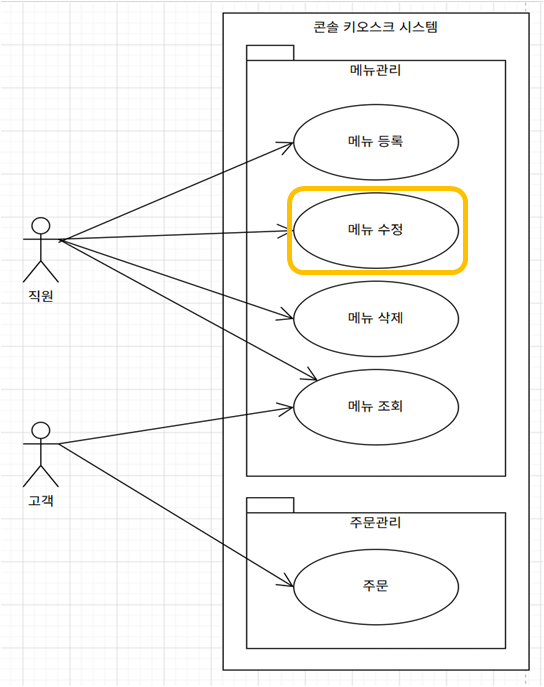
2. 카페키오스크 유스케이스 다이어그램 - "어떤 기능들을 구현할까"를 정의


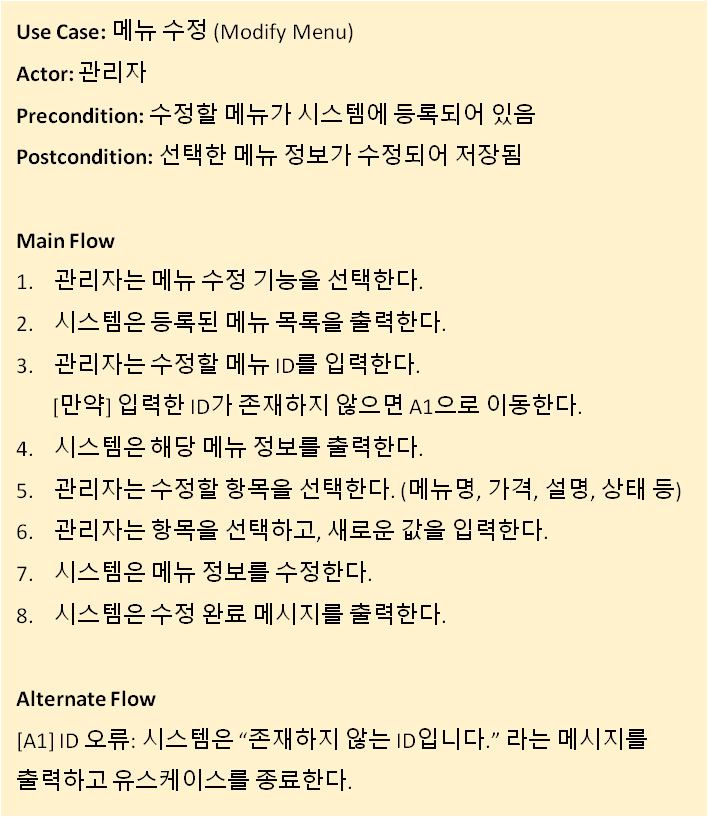
3. 메뉴 등록 유스케이스 명세서 - "하나의 기능을 어떤 순서로 실행할까? 를 정의

Use case Diagarm Use case Description


[제출 1]  메뉴수정 시퀀스 다이어그램

[제출 2]  수정기능으로 보완된 메뉴관리 클래스 다이어그램 

[제출3] 메뉴 수정 기능이 구현된 코드

kiosk_ui.__select_modify_menu() 코드 예시

 def __select_modify_menu(self):

        print("\n[메뉴 수정]")
        menu_list = self.__menu_controller.retrieve_menu_list()

        if not menu_list:
            print("메뉴 없음")
            return
        
        self.__display_menu_list(menu_list)

        menu_id = input("수정할 메뉴 id를 선택하세요: ")
        menu_item = self.__menu_controller.retrieve_menu_by_id(menu_id)

        if menu_item is None:
            print("존재하지 않는 ID입니다.")
            return

        print("\n[현재 메뉴 정보]")
        print(f"메뉴명 : {menu_item['name']}")
        print(f"가격   : {menu_item['price']}")
        print(f"설명   : {menu_item['description']}")
        print(f"상태   : {menu_item['status']}")

        print("\n수정할 항목을 선택하세요.")
        print("1. 메뉴명")
        print("2. 가격")
        print("3. 설명")
        print("4. 상태")

        field_no = input("선택: ")
        if field_no not in ["1", "2", "3", "4"]:
            print("잘못된 입력")
            return

        field_value = input("새로운 값 입력: ")
        result = self.__menu_controller.modify_menu_item(menu_id,field_no,field_value)

        if result:
            print("수정 완료")
        else:
            print("수정 실패")


전체 코드 예시

class MenuItem:
    def __init__(self, menu_id, menu_type, name, price, description, status):
        self.__menu_id = menu_id
        self.__menu_type = menu_type
        self.__name = name
        self.__price = price
        self.__description = description
        self.__status = status

    @property
    def menu_id(self):
        return self.__menu_id

    @property
    def menu_type(self):
        return self.__menu_type

    @property
    def name(self):
        return self.__name

    @name.setter
    def name(self, value):
        self.__name = value

    @property
    def price(self):
        return self.__price

    @price.setter
    def price(self, value):
        self.__price = int(value)

    @property
    def description(self):
        return self.__description

    @description.setter
    def description(self, value):
        self.__description = value

    @property
    def status(self):
        return self.__status

    @status.setter
    def status(self, value):
        self.__status = value

    def to_dict(self):
        return {
            "menu_id": self.__menu_id,
            "menu_type": self.__menu_type,
            "name": self.__name,
            "price": self.__price,
            "description": self.__description,
            "status": self.__status
        }
    
class MenuRepository:
    def __init__(self):
        self.__menu_list = []
        self.__next_menu_id = 1

    def generate_menu_item_id(self):
        menu_id = self.__next_menu_id
        self.__next_menu_id += 1
        return menu_id

    def add_menu_item(self, menu_item):
        self.__menu_list.append(menu_item)

    def find_all(self):
        return self.__menu_list

    def find_by_id(self, menu_id):
        for menu_item in self.__menu_list:
            if menu_item.menu_id == menu_id:
                return menu_item
        return None


class MenuController:
    def __init__(self):
        self.__menu_repository = MenuRepository()

    def check_mandatory_field(self, name, price, status):
        return all([name, price, status])

    def register_menu_item(self, menu_type, name, price, description, status):
        menu_id = self.__menu_repository.generate_menu_item_id()
        menu_item = MenuItem(menu_id, menu_type, name, int(price), description, status)
        self.__menu_repository.add_menu_item(menu_item)

    def retrieve_menu_list(self):
        menu_items = self.__menu_repository.find_all()

        result = []

        for item in menu_items:
            result.append(item.to_dict())

        return result

    def retrieve_menu_by_id(self, menu_id):
        menu_item = self.__menu_repository.find_by_id(int(menu_id))

        if menu_item is None:
            return None
        
        return menu_item.to_dict()
    
    def modify_menu_item(self, menu_id, field, new_value):
        menu_item = self.__menu_repository.find_by_id(int(menu_id))

        if menu_item is None:
            return False
        
        if field == "1":
            menu_item.name = new_value

        elif field == "2":
            menu_item.price = new_value

        elif field == "3":
            menu_item.description = new_value

        elif field == "4":
            menu_item.status = new_value

        else:
            return False

        return True


class MainUI:
    def __init__(self):
        self.__menu_controller = MenuController()

    def run(self):

        while True:
            self.__print_main_menu()

            selected_menu = input("메뉴를 선택하세요: ")

            if selected_menu == "11":
                self.__select_register_menu()

            elif selected_menu == "12":
                self.__select_modify_menu()

            elif selected_menu == "13":
                self.__select_delete_menu()

            elif selected_menu == "14":
                self.__select_retrieve_menu()

            elif selected_menu == "21":
                self.__select_order()

            elif selected_menu == "0":
                print("프로그램 종료")
                break

            else:
                print("잘못된 입력")

    def __print_main_menu(self):
        print("\n============= 카페 키오스크 =============")
        print("메뉴관리(관리자)       주문관리(고객)")
        print("11. 메뉴 등록          21. 주문[TODO]")
        print("12. 메뉴 수정")
        print("13. 메뉴 삭제[TODO]")
        print("14. 메뉴 조회")
        print("0. 종료")
        print("========================================")

    def __select_register_menu(self):
        print("\n[메뉴 등록]")

        print("1. Coffee, 2. Dessert")
        menu_type_input = input("유형을 선택하세요: ")

        if menu_type_input == "1":
            menu_type = "Coffee"
        elif menu_type_input == "2":
            menu_type = "Dessert"
        else:
            print("잘못된 유형")
            return

        name = input("메뉴명: ")
        price = input("가격: ")
        description = input("설명: ")
        status = input("상태(1. 판매중, 2. 품절): ")

        if not self.__menu_controller.check_mandatory_field(name, price, status):
            print("누락된 정보를 입력하세요.")
            return

        self.__menu_controller.register_menu_item(menu_type,name,price,description,status)
        print("등록 완료")

    def __display_menu_list(self, menu_list):
        print(
            f"{'ID':<5}"
            f"{'Type':<10}"
            f"{'이름':<15}"
            f"{'가격':<10}"
            f"{'상태':<10}"
            f"{'설명':<20}"
        )

        print("-" * 80)

        for m in menu_list:
            print(
                f"{m['menu_id']:<5}"
                f"{m['menu_type']:<10}"
                f"{m['name']:<15}"
                f"{m['price']:<10}"
                f"{m['status']:<10}"
                f"{m['description']:<20}"
            )

        print("=" * 80)

    def __select_modify_menu(self):

        print("\n[메뉴 수정]")
        menu_list = self.__menu_controller.retrieve_menu_list()

        if not menu_list:
            print("메뉴 없음")
            return
        
        self.__display_menu_list(menu_list)

        menu_id = input("수정할 메뉴 id를 선택하세요: ")
        menu_item = self.__menu_controller.retrieve_menu_by_id(menu_id)

        if menu_item is None:
            print("존재하지 않는 ID입니다.")
            return

        print("\n[현재 메뉴 정보]")
        print(f"메뉴명 : {menu_item['name']}")
        print(f"가격   : {menu_item['price']}")
        print(f"설명   : {menu_item['description']}")
        print(f"상태   : {menu_item['status']}")

        print("\n수정할 항목을 선택하세요.")
        print("1. 메뉴명")
        print("2. 가격")
        print("3. 설명")
        print("4. 상태")

        field_no = input("선택: ")
        if field_no not in ["1", "2", "3", "4"]:
            print("잘못된 입력")
            return

        field_value = input("새로운 값 입력: ")
        result = self.__menu_controller.modify_menu_item(menu_id,field_no,field_value)

        if result:
            print("수정 완료")
        else:
            print("수정 실패")

    def __select_retrieve_menu(self):

        print("\n[메뉴 조회]")
        menu_list = self.__menu_controller.retrieve_menu_list()
        
        if not menu_list:
            print("메뉴 없음")
            return

        self.__display_menu_list(menu_list)


    def __select_delete_menu(self):
        print("[TODO] 메뉴 삭제")

    def __select_order(self):
        print("[TODO] 주문 기능")


if __name__ == "__main__":

    ui = MainUI()
    ui.run()


콘솔키오스크_과제1 결과예시.drawio
0.21MB

2-1. 키오스크 코드에서 중복 코드 찾아 함수로 정의하고 배열의 포인터 넘기기

문제 설명

아래 코드는 콘솔 키오스크 코드의 예시로 menu_item의 등록/수정/삭제/조회 기능이 구현되어 있다. 이 중 메뉴 수정, 삭제 기능은 배열을 순회하면서 사용자가 입력한 menu_id에 해당하는 메뉴의 위치, 즉 인덱스를 찾아야 한다. 이번 문제에서는 메뉴 배열을 함수의 인자로 전달하고, 배열을 순회하여 특정 menu_id를 가진 메뉴의 인덱스를 반환하는 함수를 구현한다.


목표

  • 배열명이 함수에 전달될 때 포인터처럼 동작함을 이해한다.
  • 구조체 배열을 함수의 인자로 전달할 수 있다.
  • 배열을 순회하여 원하는 데이터를 찾을 수 있다.
  • 공통 기능을 함수로 정의하고, 필요한 곳에서 호출하여 재상요 할 수 있음을 이해한다. 
  • 검색 함수를 modify_menu_item()과 delete_menu_item()에서 재사용할 수 있다.

요구사항


1. 다음 함수를 구현하시오.

int find_menu_index(MenuItem *menu_list, int count, int menu_id);
  • 입력 매개변수
    • menuItem* menu_list : 순회할 메뉴리스트의 주소를 받는다. 
    • int count: 등록된 메뉴 개수 
    • int menu_id: 찾고자 하는 메뉴 id
  • find_menu_index() 함수의 기능은 다음과 같다.
    • menu_list 배열을 처음부터 count 까지 순회한다.
    • 배열 요소의 menu_id가 찾고자 하는 menu_id와 같으면 해당 인덱스를 반환한다.
    • 찾지 못하면 -1을 반환한다.

2. modify_menu_item() 함수에서 직접 반복문으로 메뉴를 찾지 말고, find_menu_index() 함수를 사용하시오.

3. delete_menu_item() 함수에서도 직접 반복문으로 메뉴를 찾지 말고, find_menu_index() 함수를 사용하시오.


개념 확인 질문

  1. find_menu_index() 함수에서 MenuItem *menu_list는 무엇을 의미하는가?
  2. coffee_menu_list를 함수에 전달하면 배열 전체가 복사되는가, 배열의 시작 주소가 전달되는가?
  3. 메뉴를 찾지 못했을 때 -1을 반환하는 이유는 무엇인가?
  4. find_menu_index() 함수를 만들면 modify와 delete 코드가 왜 더 좋아지는가?


2-2. 키오스크 코드에서  배열 요소 삭제 함수 구현 (Call-by-reference)


문제설명

메뉴를 삭제할 경우 삭제된 위치 뒤의 요소들을 한 칸씩 앞으로 이동(shift)해야 하며, 메뉴 개수(count)도 감소해야 한다. 이번 문제에서는 배열과 count를 함수의 인자로 전달하여 커피 메뉴나 디저트 메뉴에서 삭제할때 사용할 함수를 구현한다.


목표

  • 구조체 배열을 함수의 인자로 전달할 수 있다.
  • 배열 요소를 shift하여 삭제 기능을 구현할 수 있다.
  • count 값을 함수 내부에서 변경하기 위해 Call-by-reference 방식(포인터 전달)을 사용할 수 있다.

요구사항


1. 다음 함수를 구현하시오.

void delete_menu(MenuItem *menu_list, int *p_menu_count, int delete_index);
 
  • 입력매개변수
    • MenuItem* menu_list: 삭제하고자 하는 메뉴리스트 배열의 포인터
    • int *p_menu_counter: 삭제하고자 하는 메뉴리스트의 현재 등록된 메뉴항목 개수를 가리키는 포인터
    • int delete_index: 삭제하고자 하는 요소의 index
  • delete_menu() 함수의 동작은 다음과 같다.
    • delete_index 위치의 메뉴를 삭제한다.
    • 삭제된 위치 뒤의 요소들을 한 칸씩 앞으로 이동한다.
    • 메뉴 개수(count)를 1 감소시킨다.

2. delete_menu_item() 함수에서 직접 shift 코드를 작성하지 말고 delete_menu() 함수를 호출하시오.

3. 메뉴 개수 감소가 실제 원본 변수에 반영되도록 구현하시오. [단, 코드에서는 coffee_count, menu_count가 전역변수로 정의되어 있으나, 본 문제에서는 local 변수라 가정하고 call-by-reference를 수행한다.] 


개념확인 질문 

  • MenuItem *menu_list는 무엇을 의미하는가?
  • coffee_menu_list를 함수에 전달하면 실제로 무엇이 전달되는가?
  • menu_count를 int * menu_count 형태로 전달한 이유는 무엇인가?
  • 아래 코드에서 괄호의 위치에 따라 어떻게 다른지 설명하시오. 
(*menu_count)--;
*(menu_count--);


[수정 전 코드] 아래 코드를 사용하여 2-1, 2-2를 수행하시오. 

[콘솔키오스크] 과제 2단계. 메뉴 관리 기능 구현 [5/7] - 결과 예시 코드에서 수정/삭제의 편의를 위해 초기 데이타를 각각 5건씩 추가한 코드이다. 

#include <stdio.h>

#define MAX_MENU 10

typedef struct menu_item {
    int menu_id;
    char name[20];
    int price;
    int status;
} MenuItem;

// MenuItem coffee_menu_list[MAX_MENU];
// MenuItem dessert_menu_list[MAX_MENU];
// int coffee_count = 0;
// int dessert_count = 0;
// int next_coffee_id = 100;
// int next_dessert_id = 200;

MenuItem coffee_menu_list[MAX_MENU] = {
    {100, "Americano", 3000, 1},
    {101, "Latte", 4000, 1},
    {102, "Mocha", 4500, 1},
    {103, "VanillaLatte", 4800, 0},
    {104, "Espresso", 2500, 1}
};

MenuItem dessert_menu_list[MAX_MENU] = {
    {200, "Cake", 5000, 1},
    {201, "Cookie", 2000, 1},
    {202, "Waffle", 4500, 0},
    {203, "Macaron", 3000, 1},
    {204, "CheeseCake", 5500, 1}
};

int coffee_count = 5;
int dessert_count = 5;

int next_coffee_id = 105;
int next_dessert_id = 205;

void retrieve_coffee_menu_item(void){
    printf("\n\n====================[Coffee]======================\n");
    printf("%-4s %-20s %7s   %-10s\n", "No", "Name", "Price", "Status");
    printf("----------------------------------------------------\n");
    for (int i = 0; i < coffee_count; i++) {
        printf("%-4d %-20s %7d   %-10s\n",
               coffee_menu_list[i].menu_id,
               coffee_menu_list[i].name,
               coffee_menu_list[i].price,
               (coffee_menu_list[i].status) ? "AVAILABLE" : "SOLD OUT");
    }
    printf("\n==================================================\n");
}

void retrieve_dessert_menu_item(void){
    printf("\n\n====================[Dessert]=====================\n");
    printf("%-4s %-20s %7s   %-10s\n", "No", "Name", "Price", "Status");
    printf("----------------------------------------------------\n");

    for (int i = 0; i < dessert_count; i++) {
        printf("%-4d %-20s %7d   %-10s\n",
               dessert_menu_list[i].menu_id,
               dessert_menu_list[i].name,
               dessert_menu_list[i].price,
               (dessert_menu_list[i].status) ? "AVAILABLE" : "SOLD OUT");
    }

    printf("\n==================================================\n");
}


void retrieve_menu_item(void){
    retrieve_coffee_menu_item();
    retrieve_dessert_menu_item();
}

void register_menu_item(void)
{
    int type;

    printf("메뉴구분 (1. 커피, 2. 디저트): ");
    scanf("%d", &type);

    if (type == 1 && coffee_count < MAX_MENU)
    {
        coffee_menu_list[coffee_count].menu_id = next_coffee_id++;
        coffee_menu_list[coffee_count].status = 1;

        printf("메뉴명: ");
        scanf(" %s", coffee_menu_list[coffee_count].name);

        printf("가격: ");
        scanf("%d", &coffee_menu_list[coffee_count].price);

        coffee_count++;
    }
    else if (type == 2 && dessert_count < MAX_MENU) 
    {
        dessert_menu_list[dessert_count].menu_id = next_dessert_id++;
        dessert_menu_list[dessert_count].status = 1;

        printf("메뉴명: ");
        scanf(" %s", dessert_menu_list[dessert_count].name);

        printf("가격: ");
        scanf("%d", &dessert_menu_list[dessert_count].price);

        dessert_count++;
    }
    else
    {
        printf("등록 실패\n");
    }
}

void modify_menu_item(void)
{
    int type;
    int menu_id;
    int the_index = -1;

    printf("메뉴구분 (1. 커피, 2. 디저트): ");
    scanf("%d", &type);

    if (type == 1)
        retrieve_coffee_menu_item();
    else if (type == 2)
        retrieve_dessert_menu_item();
    else {
        printf("잘못된 메뉴구분입니다.\n");
        return;
    }

    printf("수정할 메뉴 ID: ");
    scanf("%d", &menu_id);

    if (type == 1)     {
        for (int i = 0; i < coffee_count; i++) {
            if (coffee_menu_list[i].menu_id == menu_id) {
                the_index = i;
                break;
            }
        }

        if (the_index == -1) {
            printf("해당 메뉴를 찾을 수 없습니다.\n");
            return;
        }
        
        printf("새 메뉴명: ");
        scanf(" %s", coffee_menu_list[the_index].name);

        printf("새 가격: ");
        scanf("%d", &coffee_menu_list[the_index].price);

        printf("판매상태 (1. 판매중, 0. 품절): ");
        scanf("%d", &coffee_menu_list[the_index].status);

        printf("메뉴 수정 완료\n");
    }
    else if (type == 2)
    {
        for (int i = 0; i < dessert_count; i++)
        {
            if (dessert_menu_list[i].menu_id == menu_id)
            {
                the_index = i;
                break;
            }
        }
        
        if (the_index == -1) {
            printf("해당 메뉴를 찾을 수 없습니다.\n");
            return;
        }

        printf("새 메뉴명: ");
        scanf(" %s", dessert_menu_list[the_index].name);

        printf("새 가격: ");
        scanf("%d", &dessert_menu_list[the_index].price);

        printf("판매상태 (1. 판매중, 0. 품절): ");
        scanf("%d", &dessert_menu_list[the_index].status);
    }
    printf("메뉴 수정 완료\n");
}

void delete_menu_item(void)
{
    int type;
    int menu_id;
    int the_index = -1;

    printf("메뉴구분 (1. 커피, 2. 디저트): ");
    scanf("%d", &type);
    if (type == 1)
        retrieve_coffee_menu_item();
    else if (type == 2)
        retrieve_dessert_menu_item();
    else {
        printf("잘못된 메뉴구분입니다.\n");
        return;
    }
    
    printf("삭제할 메뉴 ID: ");
    scanf("%d", &menu_id);

    if (type == 1)
    {
        for (int i = 0; i < coffee_count; i++)
        {
            if (coffee_menu_list[i].menu_id == menu_id)
            {
                the_index = i;
                break;
            }
        }

        if (the_index == -1) {
            printf("해당 메뉴를 찾을 수 없습니다.\n");
            return;
        }

        for (int i = the_index; i < coffee_count - 1; i++)
        {
            coffee_menu_list[i] = coffee_menu_list[i + 1];
        }

        coffee_count--;       
    }
    else if (type == 2)
    {
        for (int i = 0; i < dessert_count; i++)
        {
            if (dessert_menu_list[i].menu_id == menu_id)
            {
                the_index = i;
                break;
            }
        }

        if (the_index == -1)
        {
            printf("해당 메뉴를 찾을 수 없습니다.\n");
            return;
        }
        
        for (int i = the_index; i < dessert_count - 1; i++)
        {
            dessert_menu_list[i] = dessert_menu_list[i + 1];
        }

        dessert_count--;
    }

    printf("메뉴 삭제 완료\n");
}

void order(void)
{
    printf("[주문하기 기능 호출]\n");
}

void search_order(void)
{
    printf("[주문조회 기능 호출]\n");
}

void print_main_menu(void)
{
    printf("=========================================\n");
    printf("           SSU 카페 키오스크\n");
    printf("=========================================\n");
    printf("메뉴관리(관리자용)     주문관리(고객용)\n");
    printf("11. 메뉴 등록         21. 주문하기\n");
    printf("12. 메뉴 변경         22. 주문조회\n");
    printf("13. 메뉴 삭제\n");
    printf("14. 메뉴 조회\n");
    printf("0. 종료\n");
    printf("=========================================\n");
}

void run(void)
{
    int menu;

    while (1)
    {
        print_main_menu();

        printf("메뉴 번호를 입력하세요 (0: 종료): ");
        scanf("%d", &menu);

        switch (menu)
        {
            case 0:
                printf("프로그램 종료\n");
                return;

            case 11:
                register_menu_item();
                break;

            case 12:
                modify_menu_item();
                break;

            case 13:
                delete_menu_item();
                break;

            case 14:
                retrieve_menu_item();
                break;

            case 21:
                order();
                break;

            case 22:
                search_order();
                break;

            default:
                printf("잘못된 입력\n");
        }

        printf("\n");
    }
}
 
int main(void)
{
    run();
    
    return 0;
}


예상 코드

더보기
더보기
#include <stdio.h>

#define MAX_MENU 10

typedef struct menu_item {
    int menu_id;
    char name[20];
    int price;
    int status;
} MenuItem;

// MenuItem coffee_menu_list[MAX_MENU];
// MenuItem dessert_menu_list[MAX_MENU];

// int coffee_count = 0;
// int dessert_count = 0;

// int next_coffee_id = 100;
// int next_dessert_id = 200;

MenuItem coffee_menu_list[MAX_MENU] = {
    {100, "Americano", 3000, 1},
    {101, "Latte", 4000, 1},
    {102, "Mocha", 4500, 1},
    {103, "VanillaLatte", 4800, 0},
    {104, "Espresso", 2500, 1}
};

MenuItem dessert_menu_list[MAX_MENU] = {
    {200, "Cake", 5000, 1},
    {201, "Cookie", 2000, 1},
    {202, "Waffle", 4500, 0},
    {203, "Macaron", 3000, 1},
    {204, "CheeseCake", 5500, 1}
};

int coffee_count = 5;
int dessert_count = 5;

int next_coffee_id = 105;
int next_dessert_id = 205;

int find_menu_index(MenuItem *menu_list, int count, int menu_id)
{
    for (int i = 0; i < count; i++)
    {
        if (menu_list[i].menu_id == menu_id)
        {
            return i;
        }
    }

    return -1;
}

void delete_menu(MenuItem *menu_list, int *p_menu_count, int delete_index)
{
    for (int i = delete_index; i < (*p_menu_count) - 1; i++)
    {
        menu_list[i] = menu_list[i + 1];  // i+1번째 요소를 i번째 요소로 shift
    }

    (*p_menu_count)--;
}

void retrieve_coffee_menu_item(void){
    printf("\n\n====================[Coffee]======================\n");
    printf("%-4s %-20s %7s   %-10s\n", "No", "Name", "Price", "Status");
    printf("----------------------------------------------------\n");
    for (int i = 0; i < coffee_count; i++) {
        printf("%-4d %-20s %7d   %-10s\n",
               coffee_menu_list[i].menu_id,
               coffee_menu_list[i].name,
               coffee_menu_list[i].price,
               (coffee_menu_list[i].status) ? "AVAILABLE" : "SOLD OUT");
    }
    printf("\n==================================================\n");
}

void retrieve_dessert_menu_item(void){
    printf("\n\n====================[Dessert]=====================\n");
    printf("%-4s %-20s %7s   %-10s\n", "No", "Name", "Price", "Status");
    printf("----------------------------------------------------\n");

    for (int i = 0; i < dessert_count; i++) {
        printf("%-4d %-20s %7d   %-10s\n",
               dessert_menu_list[i].menu_id,
               dessert_menu_list[i].name,
               dessert_menu_list[i].price,
               (dessert_menu_list[i].status) ? "AVAILABLE" : "SOLD OUT");
    }

    printf("\n==================================================\n");
}


void retrieve_menu_item(void){
    retrieve_coffee_menu_item();
    retrieve_dessert_menu_item();
}

void register_menu_item(void)
{
    int type;

    printf("메뉴구분 (1. 커피, 2. 디저트): ");
    scanf("%d", &type);

    if (type == 1 && coffee_count < MAX_MENU)
    {
        coffee_menu_list[coffee_count].menu_id = next_coffee_id++;
        coffee_menu_list[coffee_count].status = 1;

        printf("메뉴명: ");
        scanf(" %s", coffee_menu_list[coffee_count].name);

        printf("가격: ");
        scanf("%d", &coffee_menu_list[coffee_count].price);

        coffee_count++;
    }
    else if (type == 2 && dessert_count < MAX_MENU) 
    {
        dessert_menu_list[dessert_count].menu_id = next_dessert_id++;
        dessert_menu_list[dessert_count].status = 1;

        printf("메뉴명: ");
        scanf(" %s", dessert_menu_list[dessert_count].name);

        printf("가격: ");
        scanf("%d", &dessert_menu_list[dessert_count].price);

        dessert_count++;
    }
    else
    {
        printf("등록 실패\n");
    }
}

void modify_menu_item(void)
{
    int type;
    int menu_id;
    int the_index = -1;

    printf("메뉴구분 (1. 커피, 2. 디저트): ");
    scanf("%d", &type);

    if (type == 1)
        retrieve_coffee_menu_item();
    else if (type == 2)
        retrieve_dessert_menu_item();
    else {
        printf("잘못된 메뉴구분입니다.\n");
        return;
    }

    printf("수정할 메뉴 ID: ");
    scanf("%d", &menu_id);

    if (type == 1) {

        the_index = find_menu_index(coffee_menu_list, coffee_count, menu_id);

        if (the_index == -1) {
            printf("해당 메뉴를 찾을 수 없습니다.\n");
            return;
        }
        
        printf("새 메뉴명: ");
        scanf(" %s", coffee_menu_list[the_index].name);

        printf("새 가격: ");
        scanf("%d", &coffee_menu_list[the_index].price);

        printf("판매상태 (1. 판매중, 0. 품절): ");
        scanf("%d", &coffee_menu_list[the_index].status);

        printf("메뉴 수정 완료\n");
    }
    else if (type == 2)
    {
        the_index = find_menu_index(dessert_menu_list, dessert_count, menu_id);
      
        if (the_index == -1) {
            printf("해당 메뉴를 찾을 수 없습니다.\n");
            return;
        }

        printf("새 메뉴명: ");
        scanf(" %s", dessert_menu_list[the_index].name);

        printf("새 가격: ");
        scanf("%d", &dessert_menu_list[the_index].price);

        printf("판매상태 (1. 판매중, 0. 품절): ");
        scanf("%d", &dessert_menu_list[the_index].status);
    }
    printf("메뉴 수정 완료\n");
}

void delete_menu_item(void)
{
    int type;
    int menu_id;
    int the_index = -1;

    printf("메뉴구분 (1. 커피, 2. 디저트): ");
    scanf("%d", &type);

    if (type == 1)
        retrieve_coffee_menu_item();
    else if (type == 2)
        retrieve_dessert_menu_item();
    else {
        printf("잘못된 메뉴구분입니다.\n");
        return;
    }
    
    printf("삭제할 메뉴 ID: ");
    scanf("%d", &menu_id);

    if (type == 1) {
        the_index = find_menu_index(coffee_menu_list, coffee_count, menu_id);
       
        if (the_index == -1) {
            printf("해당 메뉴를 찾을 수 없습니다.\n");
            return;
        }

        delete_menu(coffee_menu_list, &coffee_count,the_index);
    }
    else if (type == 2) {
        the_index = find_menu_index(dessert_menu_list, dessert_count, menu_id);

        if (the_index == -1)
        {
            printf("해당 메뉴를 찾을 수 없습니다.\n");
            return;
        }

        delete_menu(dessert_menu_list, &dessert_count,the_index);
    }

    printf("메뉴 삭제 완료\n");
}

void order(void)
{
    printf("[주문하기 기능 호출]\n");
}

void search_order(void)
{
    printf("[주문조회 기능 호출]\n");
}

void print_main_menu(void)
{
    printf("=========================================\n");
    printf("           SSU 카페 키오스크\n");
    printf("=========================================\n");
    printf("메뉴관리(관리자용)     주문관리(고객용)\n");
    printf("11. 메뉴 등록         21. 주문하기\n");
    printf("12. 메뉴 변경         22. 주문조회\n");
    printf("13. 메뉴 삭제\n");
    printf("14. 메뉴 조회\n");
    printf("0. 종료\n");
    printf("=========================================\n");
}

void run(void)
{
    int menu;

    while (1)
    {
        print_main_menu();

        printf("메뉴 번호를 입력하세요 (0: 종료): ");
        scanf("%d", &menu);

        switch (menu)
        {
            case 0:
                printf("프로그램 종료\n");
                return;

            case 11:
                register_menu_item();
                break;

            case 12:
                modify_menu_item();
                break;

            case 13:
                delete_menu_item();
                break;

            case 14:
                retrieve_menu_item();
                break;

            case 21:
                order();
                break;

            case 22:
                search_order();
                break;

            default:
                printf("잘못된 입력\n");
        }

        printf("\n");
    }
}
 
int main(void)
{
    run();
    
    return 0;
}


+ Recent posts