[실습과제] Dessert 클래스 추가하기
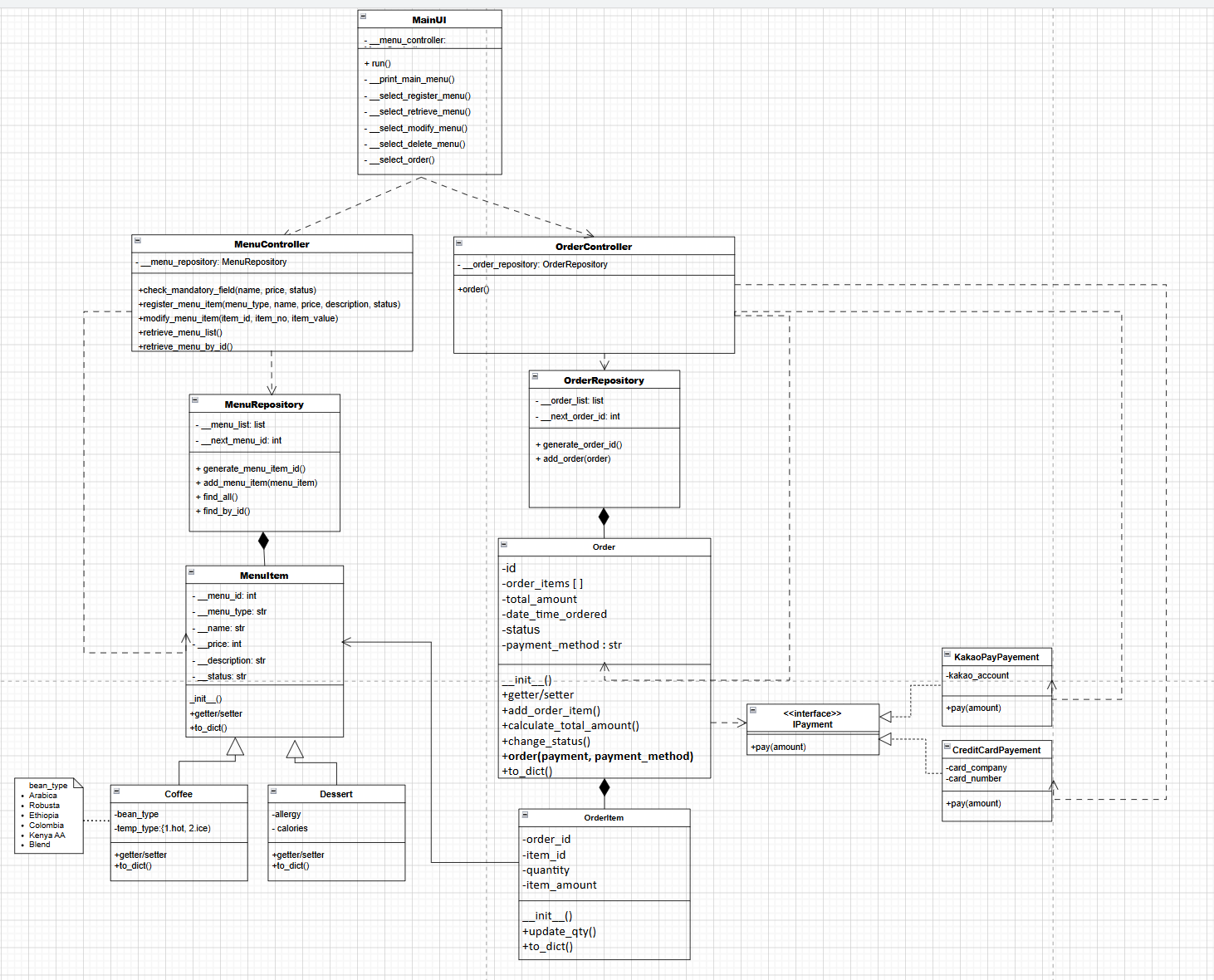
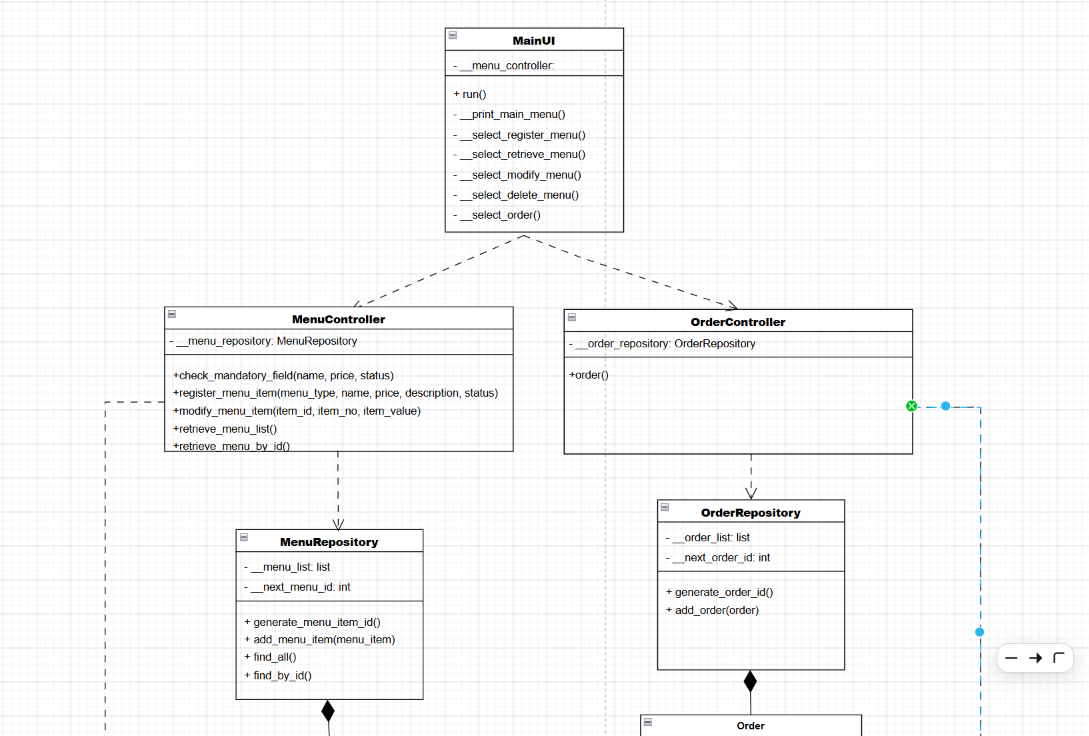
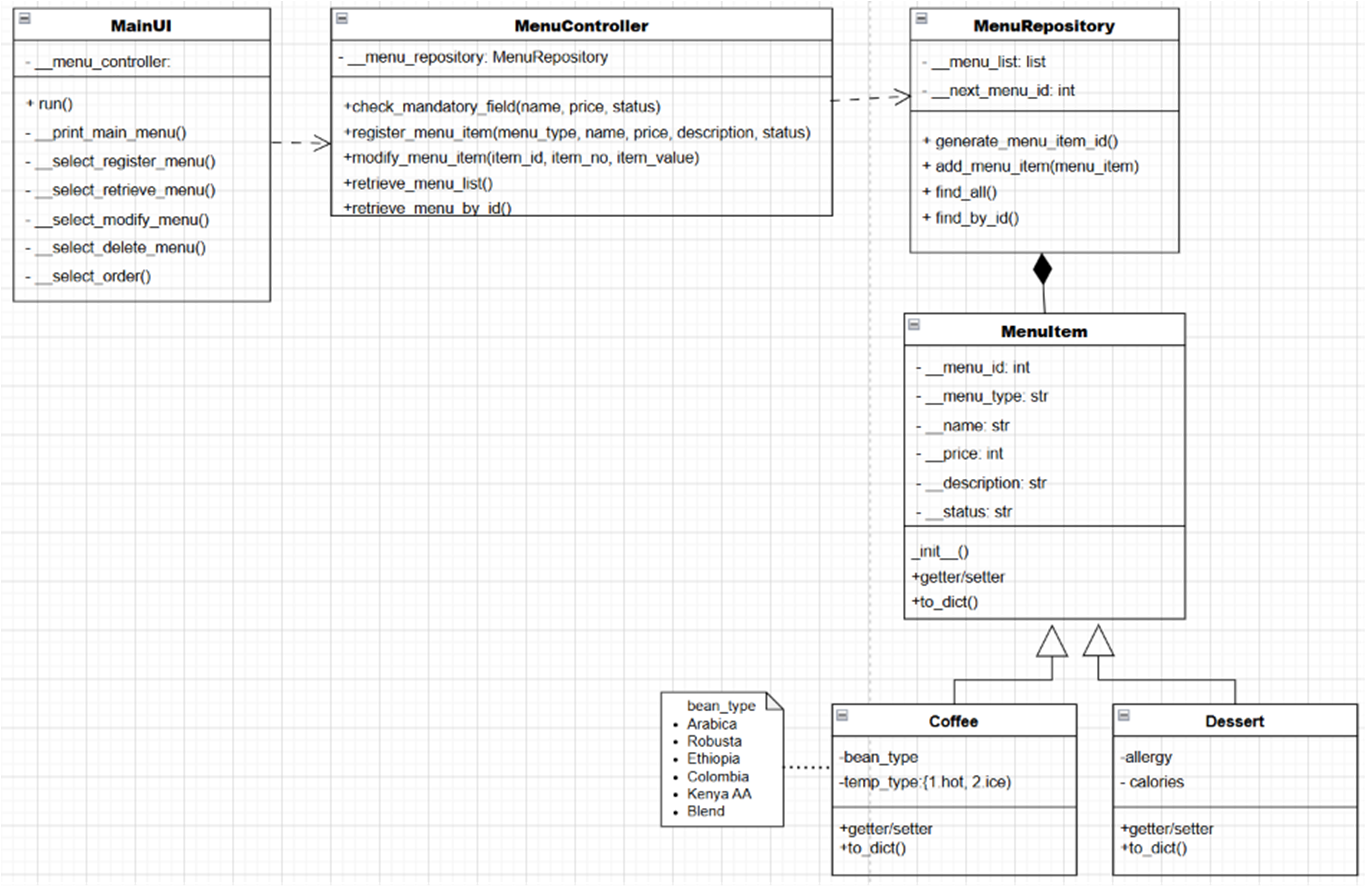
위 1번의 클래스 다이어그램과 2번의 예시코드를 기반으로 MenuItem에 Dessert 클래스를 추가하고 코드를 완성하시오. 단, 메뉴 관리는 등록/수정/조회 기능을 필수로 구현하고 삭제 기능은 등록/수정/조회 기능이 완성 된 후에 구현하시오.
[제출 1] 메뉴관리 클래스 다이어그램 (Dessert 클래스 추가)
[제출 2] 메뉴관리 구현 코드
KioskUI, MenuController, MenuRepository, MenuItem, Coffee, Dessert 클래스 포함
class MenuItem:
    def __init__(self, menu_id, menu_type, name, price, description, status):
        self.__menu_id = menu_id
        self.__menu_type = menu_type
        self.__name = name
        self.__price = price
        self.__description = description
        self.__status = status

    @property
    def menu_id(self):
        return self.__menu_id

    @property
    def menu_type(self):
        return self.__menu_type

    @property
    def name(self):
        return self.__name

    @name.setter
    def name(self, value):
        self.__name = value

    @property
    def price(self):
        return self.__price

    @price.setter
    def price(self, value):
        self.__price = int(value)

    @property
    def description(self):
        return self.__description

    @description.setter
    def description(self, value):
        self.__description = value

    @property
    def status(self):
        return self.__status

    @status.setter
    def status(self, value):
        self.__status = value

    def to_dict(self):
        return {
            "menu_id": self.__menu_id,
            "menu_type": self.__menu_type,
            "name": self.__name,
            "price": self.__price,
            "description": self.__description,
            "status": self.__status
        }


class Coffee(MenuItem):
    def __init__(self, menu_id, name, price, description, status, bean_type, temp_type):
        super().__init__(menu_id, "Coffee", name, price, description, status)
        self.__bean_type = bean_type
        self.__temp_type = temp_type

    @property
    def bean_type(self):
        return self.__bean_type

    @bean_type.setter
    def bean_type(self, value):
        self.__bean_type = value

    @property
    def temp_type(self):
        return self.__temp_type

    @temp_type.setter
    def temp_type(self, value):
        self.__temp_type = value

    def to_dict(self):
        menu_data = super().to_dict()
        menu_data["bean_type"] = self.__bean_type
        menu_data["temp_type"] = self.__temp_type
        return menu_data


class Dessert(MenuItem):
    def __init__(self, menu_id, name, price, description, status, allergy, calories):
        super().__init__(menu_id, "Dessert", name, price, description, status)
        self.__allergy = allergy
        self.__calories = calories

    @property
    def allergy(self):
        return self.__allergy

    @allergy.setter
    def allergy(self, value):
        self.__allergy = value

    @property
    def calories(self):
        return self.__calories

    @calories.setter
    def calories(self, value):
        self.__calories = int(value)

    def to_dict(self):
        menu_data = super().to_dict()
        menu_data["allergy"] = self.__allergy
        menu_data["calories"] = self.__calories
        return menu_data


class MenuRepository:
    def __init__(self):
        self.__menu_list = []
        self.__next_menu_id = 1

    def generate_menu_item_id(self):
        menu_id = self.__next_menu_id
        self.__next_menu_id += 1
        return menu_id

    def add_menu_item(self, menu_item):
        self.__menu_list.append(menu_item)

    def find_all(self):
        return self.__menu_list

    def find_by_id(self, menu_id):
        for menu_item in self.__menu_list:
            if menu_item.menu_id == menu_id:
                return menu_item
        return None

    def find_by_type(self, menu_type):
        result = []

        for menu_item in self.__menu_list:
            if menu_item.menu_type == menu_type:
                result.append(menu_item)

        return result


class MenuController:
    def __init__(self):
        self.__menu_repository = MenuRepository()

    def check_mandatory_field(self, name, price, status):
        return all([name, price, status])

    def register_menu_item(self, menu_type, name, price, description, status,
                           bean_type=None, temp_type=None, allergy=None, calories=None):

        menu_id = self.__menu_repository.generate_menu_item_id()

        if menu_type == "Coffee":
            menu_item = Coffee(menu_id, name, int(price), description, status, bean_type, temp_type)

        elif menu_type == "Dessert":
            menu_item = Dessert(menu_id, name, int(price), description, status, allergy, calories)

        else:
            menu_item = MenuItem(menu_id, menu_type, name, int(price), description, status)

        self.__menu_repository.add_menu_item(menu_item)

    def retrieve_menu_list(self):
        menu_items = self.__menu_repository.find_all()
        result = []

        for item in menu_items:
            result.append(item.to_dict())

        return result

    def retrieve_menu_by_id(self, menu_id):
        menu_item = self.__menu_repository.find_by_id(int(menu_id))

        if menu_item is None:
            return None

        return menu_item.to_dict()

    def retrieve_menu_by_type(self, menu_type):
        menu_items = self.__menu_repository.find_by_type(menu_type)
        result = []

        for item in menu_items:
            result.append(item.to_dict())

        return result

    def modify_menu_item(self, menu_id, field, new_value):
        menu_item = self.__menu_repository.find_by_id(int(menu_id))

        if menu_item is None:
            return False

        if field == "1":
            menu_item.name = new_value

        elif field == "2":
            menu_item.price = new_value

        elif field == "3":
            menu_item.description = new_value

        elif field == "4":
            menu_item.status = new_value

        elif field == "5":
            if isinstance(menu_item, Coffee):
                menu_item.bean_type = new_value
            elif isinstance(menu_item, Dessert):
                menu_item.allergy = new_value
            else:
                return False

        elif field == "6":
            if isinstance(menu_item, Coffee):
                menu_item.temp_type = new_value
            elif isinstance(menu_item, Dessert):
                menu_item.calories = new_value
            else:
                return False

        else:
            return False

        return True


class MainUI:
    def __init__(self):
        self.__menu_controller = MenuController()

    def run(self):
        while True:
            self.__print_main_menu()
            selected_menu = input("메뉴를 선택하세요: ")

            if selected_menu == "11":
                self.__select_register_menu()

            elif selected_menu == "12":
                self.__select_modify_menu()

            elif selected_menu == "13":
                self.__select_delete_menu()

            elif selected_menu == "14":
                self.__select_retrieve_menu()

            elif selected_menu == "21":
                self.__select_order()

            elif selected_menu == "0":
                print("프로그램 종료")
                break

            else:
                print("잘못된 입력")

    def __print_main_menu(self):
        print("\n============= 카페 키오스크 =============")
        print("메뉴관리(관리자)       주문관리(고객)")
        print("11. 메뉴 등록          21. 주문[TODO]")
        print("12. 메뉴 수정")
        print("13. 메뉴 삭제[TODO]")
        print("14. 메뉴 조회")
        print("0. 종료")
        print("========================================")

    def __select_register_menu(self):
        print("\n[메뉴 등록]")
        print("1. Coffee")
        print("2. Dessert")

        menu_type_input = input("유형 선택: ")

        if menu_type_input == "1":
            menu_type = "Coffee"

        elif menu_type_input == "2":
            menu_type = "Dessert"

        else:
            print("잘못된 입력")
            return

        name = input("메뉴명: ")
        price = input("가격: ")
        description = input("설명: ")
        status = input("상태(1. 판매중, 2. 품절): ")

        bean_type = None
        temp_type = None
        allergy = None
        calories = None

        if menu_type == "Coffee":
            print("\n원두 종류")
            print("Arabica, Robusta, Ethiopia, Colombia, Kenya AA, Blend")
            bean_type = input("원두 종류 입력: ")

            print("\n온도 선택")
            print("hot, ice")
            temp_type = input("선택: ")

            if temp_type not in ["hot", "ice"]:
                print("잘못된 입력")
                return

        elif menu_type == "Dessert":
            allergy = input("알레르기 정보: ")
            calories = input("칼로리: ")

        if not self.__menu_controller.check_mandatory_field(name, price, status):
            print("누락된 정보를 입력하세요.")
            return

        self.__menu_controller.register_menu_item(
            menu_type, name, price, description, status,
            bean_type, temp_type, allergy, calories
        )

        print("등록 완료")

    def __display_menu_list(self, menu_list):
        print(
            f"{'ID':<5}"
            f"{'Type':<10}"
            f"{'이름':<15}"
            f"{'가격':<10}"
            f"{'상태':<10}"
            f"{'설명':<20}"
            f"{'원두':<15}"
            f"{'온도':<10}"
            f"{'알레르기':<15}"
            f"{'칼로리':<10}"
        )
        print("-" * 130)

        for m in menu_list:
            print(
                f"{m['menu_id']:<5}"
                f"{m['menu_type']:<10}"
                f"{m['name']:<15}"
                f"{m['price']:<10}"
                f"{m['status']:<10}"
                f"{m['description']:<20}"
                f"{m.get('bean_type', ''):<15}"
                f"{m.get('temp_type', ''):<10}"
                f"{m.get('allergy', ''):<15}"
                f"{m.get('calories', ''):<10}"
            )

        print("=" * 130)

    def __select_modify_menu(self):
        print("\n[메뉴 수정]")

        menu_list = self.__menu_controller.retrieve_menu_list()

        if not menu_list:
            print("메뉴 없음")
            return

        self.__display_menu_list(menu_list)

        menu_id = input("수정할 메뉴 ID 입력: ")
        menu_item = self.__menu_controller.retrieve_menu_by_id(menu_id)

        if menu_item is None:
            print("존재하지 않는 ID입니다.")
            return

        print("\n[현재 메뉴 정보]")
        print(f"메뉴명 : {menu_item['name']}")
        print(f"가격   : {menu_item['price']}")
        print(f"설명   : {menu_item['description']}")
        print(f"상태   : {menu_item['status']}")

        print("\n수정 항목")
        print("1. 메뉴명")
        print("2. 가격")
        print("3. 설명")
        print("4. 상태")

        if menu_item["menu_type"] == "Coffee":
            print(f"원두   : {menu_item['bean_type']}")
            print(f"온도   : {menu_item['temp_type']}")
            print("5. 원두")
            print("6. 온도")

        elif menu_item["menu_type"] == "Dessert":
            print(f"알레르기 : {menu_item['allergy']}")
            print(f"칼로리   : {menu_item['calories']}")
            print("5. 알레르기")
            print("6. 칼로리")

        field_no = input("선택: ")
        field_value = input("새로운 값 입력: ")

        result = self.__menu_controller.modify_menu_item(menu_id, field_no, field_value)

        if result:
            print("수정 완료")

        else:
            print("수정 실패")

    def __select_retrieve_menu(self):
        print("\n[메뉴 조회]")
        print("1. 전체 조회")
        print("2. Coffee 조회")
        print("3. Dessert 조회")

        selected_menu = input("선택: ")

        if selected_menu == "1":
            menu_list = self.__menu_controller.retrieve_menu_list()

        elif selected_menu == "2":
            menu_list = self.__menu_controller.retrieve_menu_by_type("Coffee")

        elif selected_menu == "3":
            menu_list = self.__menu_controller.retrieve_menu_by_type("Dessert")

        else:
            print("잘못된 입력")
            return

        if not menu_list:
            print("메뉴 없음")
            return

        self.__display_menu_list(menu_list)

    def __select_delete_menu(self):
        print("[TODO] 메뉴 삭제")

    def __select_order(self):
        print("[TODO] 주문 기능")


if __name__ == "__main__":
    ui = MainUI()
    ui.run()